Getting Started
This guide will help you quickly install slow-rotations. A molecular dynamics simulation analysis package to flag slow torsional motions that may indicate sampling issues.
Installation
Clone the github repository
git clone git@github.com:MobleyLab/slow-rotations.git
Navigate to the top level of the slow-rotations github repository
Install the environment needed to run slow-rotations
mamba env create -f environment.yaml
Install slow-rotations from the top level of the slow-rotations github repository
pip install -e .
You should be able to run
slow-rotationsscripts now!
Using slow-rotations for analyzing small molecule torsions
To use slow rotations to analyze small molecule torsions, use an object found in the torsions module called LigandTorsionFinder.
This object requires:
a trajectory file
a topology file
3 letter code for the small molecule
SMILES string to extract the bond information for the small molecules
This object finds all torsions across rotatable bonds, analyzes each torsion for the states it prefers to occupy, and counts the transitions between states across the time series.
from slow_rotations import torsions

topf = 'traj.gro'
trajf = 'traj.xtc'
smiles = "[H]c1c(c(c(c(c1C(=O)O[H])O[H])[H])N([H])[H])[H]"
ligcode = "LIG"

tf = torsions.LigandTorsionFinder(trajf,topf,ligcode,smiles)

results = {}

# loop through torsions in the small molecule
# each torsion is represented by 4 atom indices
for tor in tf.get_torsions():
	imgname = f'{"_".join(map(str, tor))}.png'
	t_result = ligcomp.make_torsion_img(t,save_path=f"{imgname}")

	results[tor] = t_result
You can also analyze multiple simulations with the same small molecule at one time, and compare across simulations
from slow_rotations import torsions

topfs = ['traj1.gro', 'traj2.gro', 'traj3.gro']
trajfs = ['traj1.xtc', 'traj2.xtc', 'traj3.xtc']
smiles = "[H]c1c(c(c(c(c1C(=O)O[H])O[H])[H])N([H])[H])[H]"
ligcode = "LIG"

tf_list = []
for topf, trajf in zip(topfs, trajfs):
	tf_list.append(torsions.LigandTorsionFinder(trajf,topf,ligcode,smiles))


comparator = compare.LigandTorsionComparator(tf_list)

for tor in comparator.get_torsions():
	imgname = f'{"_".join(map(str, tor))}.png'
	t_result = comparator.plot_all_distributions(t,save_path=f"{imgname}")

	results[tor] = t_result
The torsion analysis results from either the LigandTorsionFinder or the LigandTorsionComparator can be saved into a .json file.
import json

with open("mol_torsiondata.json", "w") as f:
	json.dump(results, f)
This json file can be analyzed for torsions that may have sampling problems.
from slow_rotations import torsiondata as td
from slow_rotations import analysis

torsion_data_ifile = "smallmolecule_torsiondata.json"
flagged_torsions_ofile = "smallmolecule_flagged_torsions.csv"

with open(torsion_data_ifile, "r") as f:
    json_str = f.read()

data = td.TorsionData.from_json(json_str)

for tname in data.list_torsions():
	torsion = data.get_torsion(tname)
	for rnum,rpt in torsion.repeats.items():
		if check_transitions(rpt) or check_states(rpt):
			print(f'{torsion} suspected sampling problem')
Run a pre-made example for small molecules
Example scripts and outputs can be found in the slow-rotations/examples path in the github directory
Download the example trajectories
Change the file paths to trajectories in
slow-rotations/examples/example_smallmolecule.pyto match the path where you have stored the example trajectoriesRun the small molecule example
python examples/example_smallmolecule.py
Look for the output torsion images and
.jsonfile inslow-rotations/examples
Analyze the each torsion for potential sampling issues
python examples/example_analysis_smallmolecule.py
Check
examples/mol_flaggedtorsions.csvto see which torsions are flagged.In the example below all 3 repeats are flagged for low transitions and repeat 1 is flagged for a missing state (see step 4)
residue
torsion
torsion_sys
repeat
low transitions
missing states
LIG1
[8, 6, 3, 0]
[2554, 2552, 2549, 2546]
0
True
LIG1
[8, 6, 3, 0]
[2554, 2552, 2549, 2546]
1
True
1
LIG1
[8, 6, 3, 0]
[2554, 2552, 2549, 2546]
2
True
Using slow-rotations for analyzing protein sidechain torsions
To use slow rotations to analyze small molecule torsions, use an object found in the torsions module called LigandTorsionFinder.
This object requires:
a trajectory file
a topology file
3 letter code for the small molecule
This object finds all torsions across rotatable bonds, analyzes each torsion for the states it prefers to occupy, and counts the transitions between states across the time series. You can focus on a specific side chain torsions based on:
distance from binding site (use the
A_cutoffkeyword)a specific selection (use the
selkeyword with MDAnalysis selection language)get_chi_x_torsions(x, AngstromDistFromBindingSite)-> a single type of chi angle (1 to 8)get_all_chi_x_torsions(AngstromDistFromBindingSite)-> all chi angles
from slow_rotations import torsions

topf = 'traj.gro'
trajf = 'traj.xtc'

ligcode = "LIG"
tf = torsions.ProteinTorsionFinder(trajf,topf,ligcode)

results = {}
for idx,t in tf.get_all_chi_x_torsions(A_cutoff=5):
	imgname = f'{"_".join(map(str, t))}.png'
	t_result = comparator.plot_all_distributions(t,save_path=f"{imgname}")

	results[tor] = t_result
You can also analyze multiple simulations with the same small molecule at one time, and compare across simulations
from slow_rotations import torsions

topfs = ['traj1.gro', 'traj2.gro', 'traj3.gro']
trajfs = ['traj1.xtc', 'traj2.xtc', 'traj3.xtc']
ligcode = "LIG"

tf_list = []
for topf, trajf in zip(topfs, trajfs):
	tf_list.append(torsions.ProteinTorsionFinder(trajf,topf,smiles))


comparator = compare.ProteinTorsionComparator(tf_list)

for tor in comparator.get_torsions():
	imgname = f'{"_".join(map(str, tor))}.png'
	t_result = compare.plot_all_distributions(t,save_path=f"{imgname}")

	results[tor] = t_result
The torsion analysis results from either the ProteinTorsionFinder or the ProteinTorsionComparator can be saved into a .json file.
import json

with open("sidechain_torsiondata.json", "w") as f:
	json.dump(results, f)
This json file can be analyzed for torsions that may have sampling problems.
from slow_rotations import torsiondata as td
from slow_rotations import analysis

torsion_data_ifile = "sidechain_torsiondata.json"
flagged_torsions_ofile = "sidechain_flagged_torsions.csv"

with open(torsion_data_ifile, "r") as f:
    json_str = f.read()

data = td.TorsionData.from_json(json_str)

for tname in data.list_torsions():
	torsion = data.get_torsion(tname)
	for rnum,rpt in torsion.repeats.items():
		if check_transitions(rpt) or check_states(rpt):
			print(f'{torsion} suspected sampling problem')
Run a pre-made example for protein sidechains
Example scripts and outputs can be found in the slow-rotations/examples path in the github directory
Download the example trajectories
Change the file paths to trajectories in
slow-rotations/examples/example_sidechain.pyto match the path where you have stored the example trajectoriesRun the small molecule example
python examples/example_sidechain.py
Look for the output torsion images and
.jsonfile inslow-rotations/examples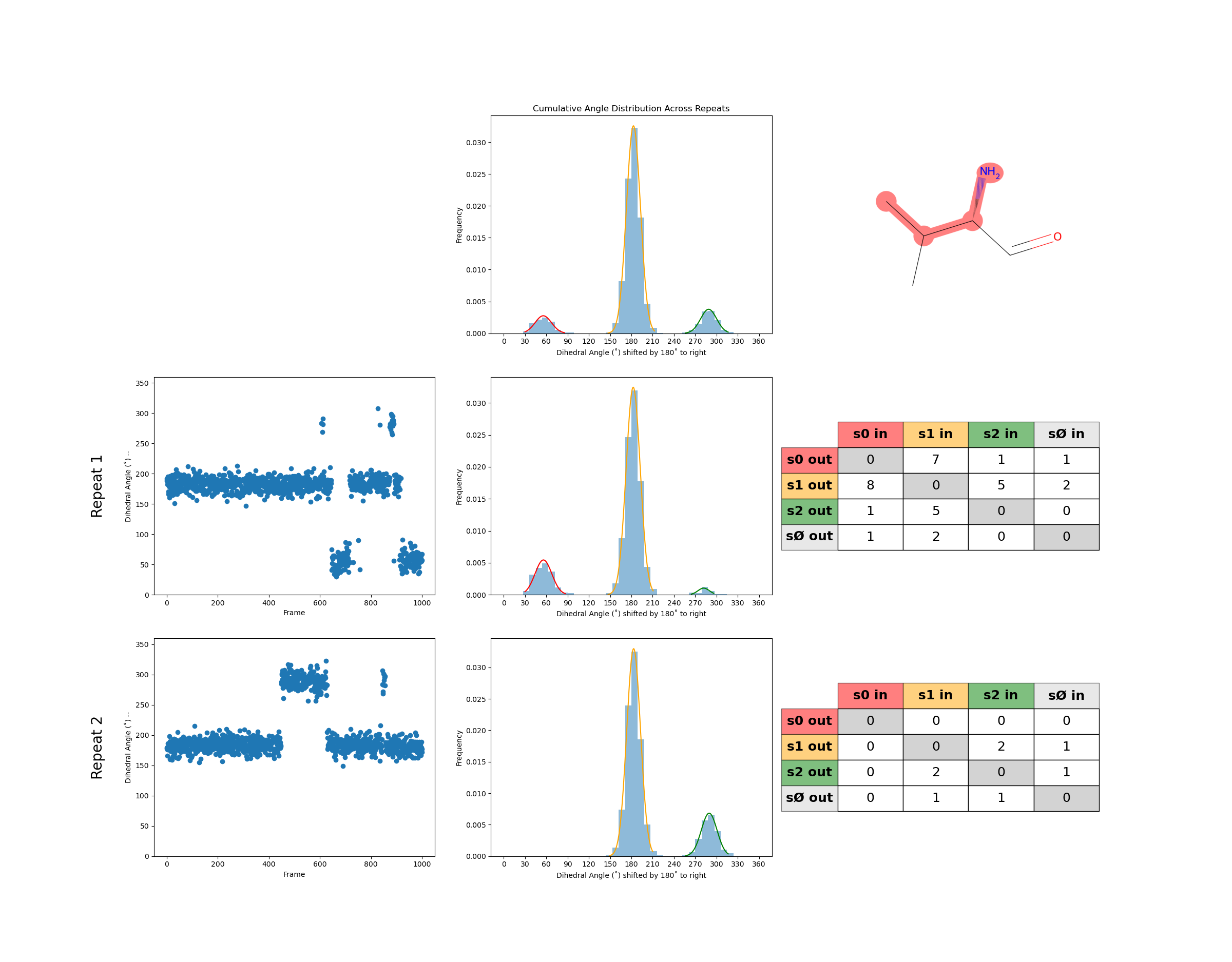
Analyze the each torsion for potential sampling issues
python examples/example_analysis_sidechain.py
Check
examples/sidechain_flaggedtorsions.csvto see which torsions are flagged.In the example below both repeats are flagged for low transitions and repeat 1 is flagged for a missing state (see step 4)
residue
chi
torsion
repeat
low transitions
missing states
VAL154
1
[2291, 2292, 2295, 2296]
0
True
VAL154
1
[2291, 2292, 2295, 2296]
1
True
0